 ThumbGlanceResizer →
YouTube thumbnail size and dimensions.
The recommended YouTube thumbnail size for videos is 3840 × 2160 pixels at 16:9, with a minimum width of 640 pixels. Keep the file under 2 MB when uploading from mobile or 50 MB from desktop. (YouTube Help, “Add custom thumbnails on YouTube”, read 2026-10-24 03:03 UTC).
Dated comparison: YouTube Help lists 3840 × 2160 (YouTube Help, “Add custom thumbnails on YouTube”, read 2026-10-24 03:03 UTC); the largest public image we could retrieve for 12 videos on October 21, 2026 (UTC) was 1280 × 720 across 72 requests; and two of the top three Google results we read on October 24, 2026 (UTC) still call 1280 × 720 the recommended size.
Recommended upload is 3840 × 2160 — see how much of it you can actually get back.
Preview the thumbnail size in six layouts
Load one JPG, PNG or WebP image locally, add an optional title, and compare the same six illustrative layouts used by the ThumbGlance thumbnail tester. The preview does not predict click-through rate or reproduce every YouTube surface.
Small-size blur check
- Load your own image or the sample.
- Select Sidebar, then compare it with Desktop and Shorts.
- Open all six layouts and complete the three manual review rows.
- Download the 1800 × 2020 PNG review sheet and inspect the actual exported file.
The exported sheet is a review image, not a thumbnail to upload to YouTube. A small preview can reveal soft lettering or a lost subject, but this check does not score blur or judge composition automatically.
Enlarged inspection view · not actual display size. Compare all layouts for small-size readability.
Limits that depend on who is uploading
- Verified accounts only: “Your account must be verified to use this feature” for custom thumbnails (YouTube Help, “Add custom thumbnails on YouTube”, read 2026-10-24 03:03 UTC).
- Uploading from a phone: 2 MB for video thumbnails or 10 MB for podcasts (YouTube Help, “Add custom thumbnails on YouTube”, read 2026-10-24 03:03 UTC).
- Uploading from a computer: 50 MB for video, Shorts and podcast thumbnails (YouTube Help, “Add custom thumbnails on YouTube”, read 2026-10-24 03:03 UTC).
- Shorts: 2160 × 3840 recommended, minimum height 640 pixels, 9:16; custom Shorts thumbnails can currently be added only in YouTube Studio on a computer (YouTube Help, “Add custom thumbnails on YouTube”, read 2026-10-24 03:03 UTC).
- Podcast playlists: 1:1 instead of 16:9 (YouTube Help, “Add custom thumbnails on YouTube”, read 2026-10-24 03:03 UTC).
- Vertical videos with a 16:9 thumbnail: replaced by an auto-generated 4:5 thumbnail on the home, explore and subscription pages (YouTube Help, “Add custom thumbnails on YouTube”, read 2026-10-24 03:03 UTC).
- Daily limit: a channel can upload only so many custom thumbnails per day; after “Daily custom thumbnail limit reached”, try again in 24 hours. The limit may vary by country/region or channel history; YouTube Help does not publish the number (YouTube Help, “Add custom thumbnails on YouTube”, read 2026-10-24 03:03 UTC).
Add a custom video thumbnail: the official steps
These steps are from YouTube Help for a computer (YouTube Help, “Add custom thumbnails on YouTube”, read 2026-10-24 03:03 UTC).
- Sign in to YouTube Studio.
- From the left menu, select Content.
- Go to the video you’d like to edit and click it.
- Below “Thumbnail”, click Upload file and choose an image on your device.
- Click Save. Changes may take time to appear on YouTube.
One table. Different upload rules.
The original rows in the comparison below record YouTube thumbnail guidelines from the cited official guidance as checked on . This is a dated comparison across placements and devices, not a historical before-and-after claim. “Not stated” means the linked guidance does not publish that specification. The table shows the YouTube video thumbnail size by upload device. When choosing a size for YouTube thumbnail artwork, use the dimensions column to check width and height and compare the resolution values before exporting. The yt thumbnail size entries distinguish pixel dimensions from file size limits.
The right thumbnail size for YouTube depends on the surface and upload device. YouTube thumbnail dimensions describe pixels; file size limits describe encoded bytes.
| Placement / upload device | Dimensions | Aspect ratio | File size limit |
|---|---|---|---|
| Video thumbnail / desktop upload Source | 3840 x 2160 pixels recommended; minimum width 640 pixels. | 16:9 | Under 50 MB |
| Video thumbnail / mobile upload Source | 3840 x 2160 pixels recommended; minimum width 640 pixels. | 16:9 | Under 2 MB |
| Shorts custom thumbnail / desktop upload Source | 2160 x 3840 pixels recommended; minimum height 640 pixels. | 9:16 | Under 50 MB |
| Shorts custom thumbnail / mobile upload Source | Not available: custom Shorts thumbnails can only be added in YouTube Studio on a computer. | Not stated by YouTube in the cited guidance. | Not stated by YouTube in the cited guidance. |
| Podcast playlist thumbnail Source | Not stated by YouTube in the cited guidance. | 1:1 | Mobile: under 10 MB; desktop: under 50 MB. |
| Channel banner Source | Recommended: 2560 x 1440 px (especially for TV). Minimum upload: 2048 x 1152 px. Text/logo safe area at that minimum: 1235 x 338 px. | 16:9 | 6 MB or smaller |
| Channel profile picture Source | Renders at 98 X 98 px. Upload pixel dimensions: not stated by YouTube in the cited guidance. | Upload ratio: not stated by YouTube in the cited guidance. | Should not exceed 15 MB |
| YouTube community post image size YouTube Help · Checked (UTC) | Pixel dimensions not stated by YouTube in the cited guidance. | 1:1 suggested | Up to 16 MB per image |
| YouTube podcast thumbnail size / show cover YouTube Help · Checked (UTC) | 1280 x 1280 pixels recommended for the square show thumbnail, not an episode video thumbnail. | 1:1 | See the podcast playlist thumbnail row above. |
The YouTube community post size row covers image attachments, not text, polls or video posts. These two supplementary rows were checked on October 14, 2026 (UTC); the CSV retains the September 16 specifications.
Download the September 16 specifications as CSV · UTF-8 · includes source URLs and the check date.
Read the limits in context
Custom thumbnails: YouTube thumbnail requirements include a verified account. Its current Shorts instructions allow custom image uploads in YouTube Studio on a computer, not mobile. The image-format examples listed for thumbnails are JPG and PNG. Official thumbnail guidance.
Shorts on a computer: in YouTube Studio, open Content → Shorts, select the video, then use Thumbnail → Upload file → Save to upload a separate 9:16 image. This is different from choosing a frame from the video. Desktop upload instructions.
Shorts on a phone: YouTube's mobile instructions let you choose a video frame before or after uploading, in the YouTube app. For an existing Short, open Your videos → More → Edit, choose the thumbnail frame, and confirm. This frame picker is in the YouTube app, rather than Studio; it does not upload a separate image. Mobile frame-selection instructions. These two workflows were checked against YouTube Help on October 4, 2026; they have not been tested on a real phone here.
Vertical video previews: the same guidance says a 16:9 custom thumbnail is replaced by an auto-generated 4:5 thumbnail on home, explore and subscription pages; the custom image remains on the watch feed, watch history and non-mobile platforms. This is a display rule, not another image-upload size.
Banners: the branding page distinguishes the minimum upload size from the recommended size. Its companion tips page separately says “at least 2560x1440 px” for best display on all devices. Both statements are retained here: branding specifications and banner tips. Keep the safe-area dimensions tied to the minimum-size canvas; do not treat them as dimensions for every canvas.
Profile pictures: 98 X 98 px describes rendering, not a published upload-resolution recommendation. The branding page lists JPG, GIF, BMP and PNG, excludes animated GIFs, and states the file limit. The tips page recommends a square or round image without specifying a numeric upload ratio. Profile picture guidelines · Profile picture tips.
Other official statements in this section were checked on September 16, 2026. Where the sources use different wording, it is shown separately rather than converted into a new requirement.
A saved Shorts image and a channel card are separate checks
In our October 6, 2026 desktop test, Studio showed a newly saved Shorts image while two later channel cards still showed the old one. The 1080 × 1920 cover also appeared cropped to about 2:3 on the desktop card. The full test, input images and downloadable data are in our Shorts dimensions guide.
See what a different ratio changes
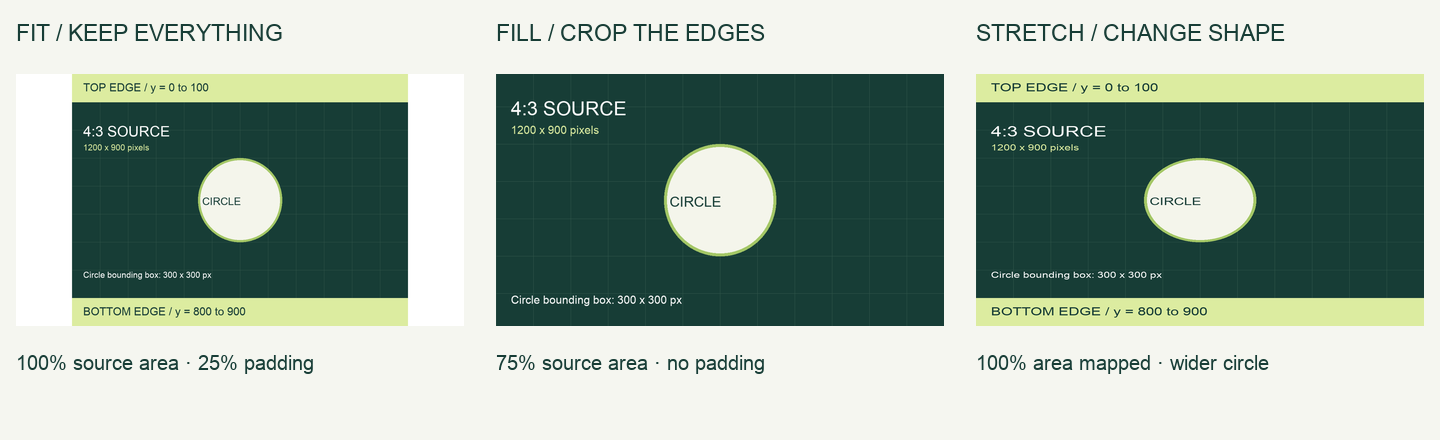
A 4:3 source can fit, crop or stretch into a 16:9 frame. A YouTube thumbnail border drawn into the image follows that same operation. Our aspect ratio experiment shows the same original image all three ways, with exact source coordinates and downloadable results. Our thumbnail ideas study measured the bottom-right duration label, a YouTube thumbnail overlay, at different sizes and positions in the same session. Those observations do not define a universal YouTube thumbnail safe zone.
YouTube thumbnail safe area
A universal YouTube thumbnail safe area is not established by those duration-label observations. Compare important content across the layout previews; a preview remains a simulation.
Conversions you can actually use
These are worked calculations, not additional YouTube requirements. The video dimensions and ratio come from the official table above; example inputs are labelled below.
Reduce width : height
For the recommended 4K YouTube thumbnail size, divide both dimensions by their greatest common divisor, 240:
3840 ÷ 240 = 16
2160 ÷ 240 = 9
3840 : 2160 = 16 : 9
To check another image without rounding, compare width × 9 with height × 16. Equal values mean an exact 16:9 ratio.
Find the missing pixel dimension
At 16:9, height = width × 9 ÷ 16. Using an example width of 1280 pixels:
1280 × 9 ÷ 16 = 720 pixels
For a 3840-pixel width: 3840 × 9 ÷ 16 = 2160. The first result is a calculated example, not the current official recommended resolution.
Pixels to inches or centimetres
To calculate a YouTube thumbnail size in inches, specify a pixel-density value. With an example density of 300 pixels per inch (PPI):
3840 ÷ 300 = 12.8 inches
12.8 × 2.54 = 32.512 cm
A second example at 96 PPI, for a 1280 × 720 image:
1280 ÷ 96 = 13.33 inches → 13.33 × 2.54 = 33.87 cm
720 ÷ 96 = 7.5 inches → 7.5 × 2.54 = 19.05 cm
Formulas: inches = pixels ÷ PPI; cm = inches × 2.54. One inch is exactly 2.54 cm by unit definition. 300 PPI is this example's input, not a YouTube rule. Pixel dimensions alone do not determine a physical size.
The real Preview test compares changing PPI with Resample off/on.
YouTube thumbnail upload size
Check YouTube thumbnail file size from the exported file's encoded bytes. For a YouTube thumbnail PNG, pixel dimensions alone do not determine whether it meets the upload limit for your device.
How many bytes is 2 MB?
In decimal units, 1 MB = 1,000,000 bytes, so:
2 × 1,000,000 = 2,000,000 bytes
Binary units differ: 1 MiB = 1,048,576 bytes, so 2 MiB = 2,097,152 bytes. These are unit definitions and arithmetic, not a measurement of YouTube's uploader. The cited YouTube page says MB but does not give an exact byte threshold or define its MB convention.
Our tester uses 2,000,000 bytes as a conservative interpretation of the mobile-video label. YouTube's own upload result remains authoritative. Pixel count does not determine encoded file size: check the actual exported bytes.
Downloaded pixels can differ from upload specifications
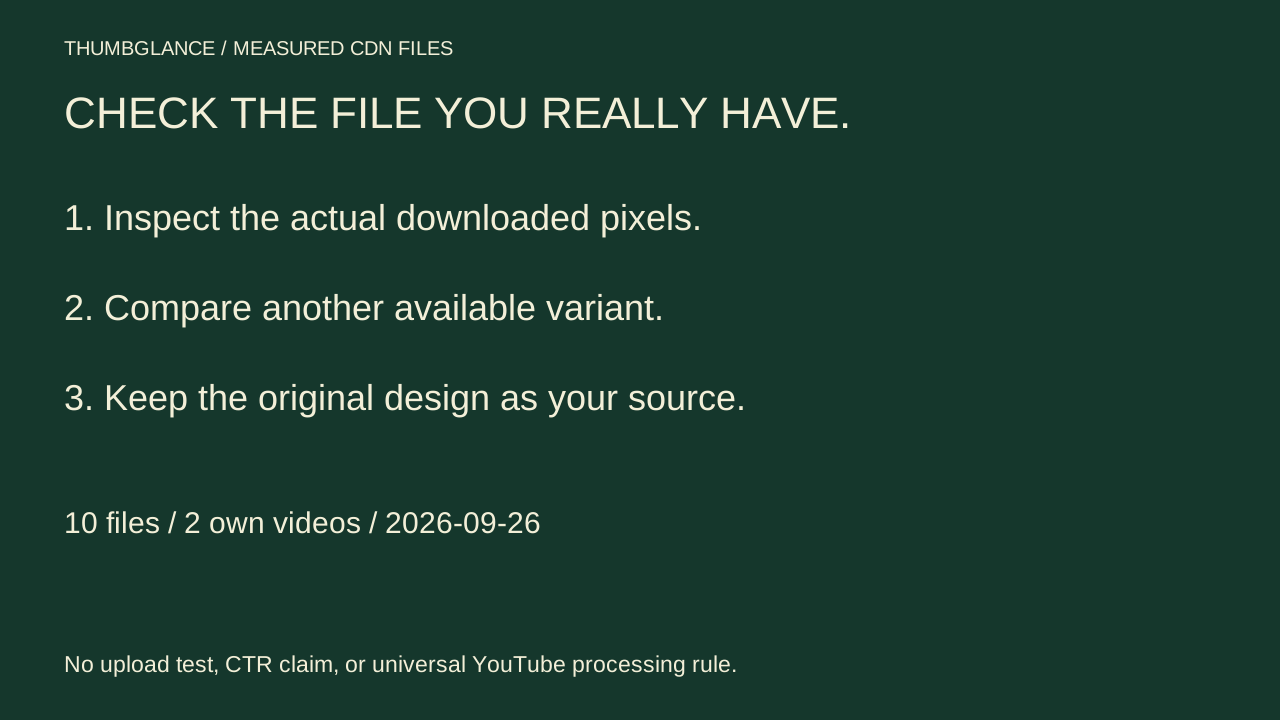
The file you retrieve from a video may be one of several served versions. Our two-video measurement found five different pixel sizes, including 4:3 JPEGs with near-black bands around a 16:9 central rectangle. These sample results are not new upload rules.
Put the dimensions to work
Preview your image across layouts, or resize it and inspect the actual exported file size.
Check your thumbnail →Resize your thumbnail →Profile picture size →
The resizer starts at a 1280 × 720 preset. Open it with the 3840 × 2160 video preset or 2160 × 3840 Shorts preset, or choose Custom dimensions for another placement. These explicitly resize your image; enlarging cannot recover missing detail.
Your image is processed in your browser and is never uploaded to any server.
Questions
What are the YouTube thumbnail dimensions?
For videos, 3840 × 2160 pixels at 16:9 with a minimum width of 640 pixels (YouTube Help, “Add custom thumbnails on YouTube”, read 2026-10-24 03:03 UTC).
What is the yt thumbnail size for Shorts?
2160 × 3840 pixels at 9:16, with a minimum height of 640 pixels (YouTube Help, “Add custom thumbnails on YouTube”, read 2026-10-24 03:03 UTC).
Is 1280 × 720 still acceptable?
It is above the 640-pixel minimum width, so it can be uploaded, but YouTube Help now recommends 3840 × 2160 (YouTube Help, “Add custom thumbnails on YouTube”, read 2026-10-24 03:03 UTC). 1280 × 720 is also the largest public image we retrieved on October 21, 2026 (UTC), so keep your own original file.