 ThumbGlance
DISCORD IMAGE SIZES
Discord banner size.
Discord recommends at least 960 × 540 px at 16:9 for a server’s channel-list banner. A main profile banner has a minimum of 680 × 240 px. A per-server profile banner has a recommended minimum of 600 × 240 px. These are three different surfaces, not three interchangeable answers.
The browser-local tool below crops one static PNG or JPG to the 960 × 540, 680 × 240 or 600 × 240 canvas. It includes the 1920 × 1080 server example as an optional site canvas. It reads the encoded file back and never uploads your image. This is an independent tool, not affiliated with Discord.
Server banner960 × 540Recommended minimum at 16:9. This is the channel-list server banner.
Main profile680 × 240Minimum pixels. Discord does not state a profile-banner ratio.
Per-server profile600 × 240Recommended minimum inside one server. Separate from Server Banners.
Discord banner sizes, without mixing the three surfaces
The table separates the channel-list Server Banner, the main Custom Profile banner and the Per-Server Profile banner. It also keeps Discovery eligibility and the old Invite Splash note in their own rows. “Not stated” means the official page read did not publish that value.
| Placement or rule | Published value | Value type | Official page | Read (UTC) |
|---|---|---|---|---|
| Server Banner | At least 960 × 540 px in a 16:9 ratio. A 1920 × 1080 upload is automatically scaled. | Recommendation plus larger upload example | Server Banners | 2026-10-30 |
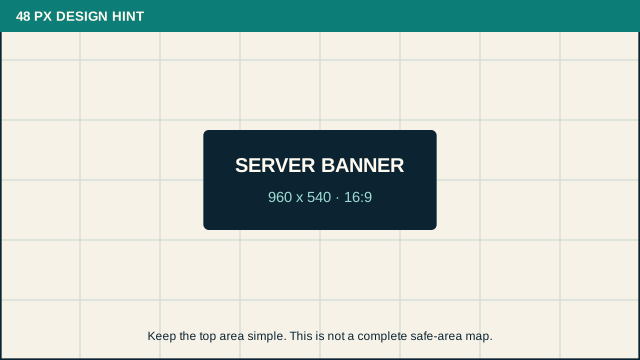
| Server Banner top area | Keep the top 48 px simple and avoid complex art, text or logos there. | Design suggestion, not a complete safe area | Server Banners | 2026-10-30 |
| Main profile banner | Minimum 680 × 240 px; PNG, JPG or animated GIF; under 10 MB; Nitro required | Minimum plus upload requirements | Custom Profiles | 2026-10-30 |
| Per-Server Profile banner | Recommended minimum 600 × 240 px; PNG, JPG or animated GIF; under 10 MB; Nitro required | Recommended minimum plus upload requirements | Per-Server Profiles | 2026-10-30 |
| Discovery eligibility | The server must have at least 1,000 members to qualify. | One Discovery condition, not a Server Banner rule | Enabling Server Discovery | 2026-10-30 |
| Server Profile and Discord Server Web Pages | Banner image dimensions: Not stated | Not on the official pages read | Server Profile; Discord Server Web Pages | 2026-10-30 |
| Old Invite Splash note | 1920 × 1080 on an older English page whose current en-us slug now opens Server Banners. | Historical Invite Splash value | Server Banner Background & Invite Splash Image | 2026-10-30 |
Do not merge the rows. The 10 MB and PNG/JPG/GIF lines belong to the two profile banners only. Server Banners states no file-size ceiling and no MIME type on the page read. The 1,000-member count is one Discovery qualification, not the normal Boost-level requirement for a server banner. The 1920 × 1080 upload example is not the minimum. The top 48 px is a design suggestion, not a complete safe-area or guaranteed no-crop boundary.
The upload check: position, pixels, file, eligibility
The failure path starts before the upload button. Work through the same six checks for every banner file.
- Name the exact surface. Channel-list Server Banner, main profile, per-server profile, Discovery/Server Profile or Invite Splash. A number from one row does not certify another row.
- Check pixels and only the stated ratio. Server Banner: at least 960 × 540 px at 16:9. Main profile: at least 680 × 240 px, with no official ratio. Per-server profile: recommended at least 600 × 240 px, with no official ratio.
- Keep the file rules with their surface. Profile banners: PNG, JPG or animated GIF and under 10 MB, plus Nitro. Server Banner: file size and MIME type are Not stated on the official page read.
- Check eligibility separately. Static Server Banners unlock at Boost Level 2 and animated banners at Level 3. Discord Partners can receive the perk without buying a Boost. A 1,000-member requirement belongs to Discovery qualification.
- Treat the top 48 px as advice. Discord says to keep that strip simple. It does not publish a complete crop-safe rectangle, so this page does not draw one.
- Read the actual export, then use support if it fails. Record the file’s width, height, MIME type and byte count. If a profile file is below 10 MB and still fails, that is a user-reported case, not proof of a universal cause. Check the chosen surface and eligibility, compare the exact exported file, and use Discord’s support path. A local pass cannot guarantee acceptance or prevent an unknown crop.
The tool below starts with these facts and reports the encoded file. The check is deliberately limited: it can compare pixels, the one published server ratio, the profile minimums, exported bytes and format. It cannot see Nitro status, Boost level, Partner status or Discord’s internal processing.
Crop a Discord banner in your browser
Choose a static PNG or JPG, then select the surface. Fill crops the image to cover the canvas. Fit keeps the whole image and adds transparent padding for PNG or the selected colour for JPG. No image leaves this browser.
Choose an image to begin.
No image loaded.
What the encoded file shows
- Choose a PNG or JPG to read back the encoded file.
Official sources: Server Banners, Custom Profiles and Per-Server Profiles — read 2026-10-30 (UTC). The main-profile canvas uses the published 680 × 240 px minimum; the per-server canvas uses the 600 × 240 px recommended minimum. The 960 × 540 server canvas is a recommendation. Those profile and server ratios are this site’s calculations.
What our own Discord crop test measured
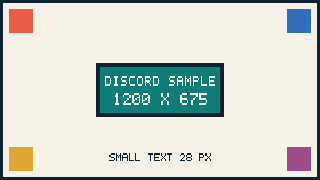
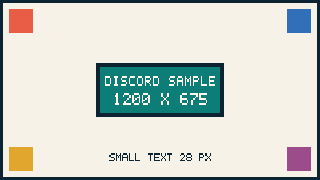
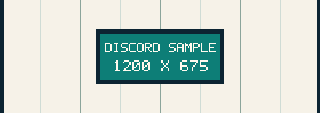
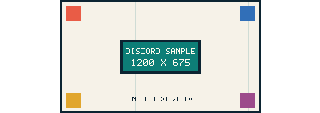
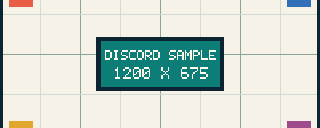
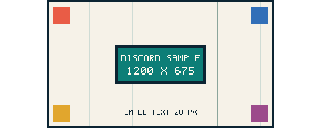
We made one deterministic 1200 × 675 px source from code: a 75 px grid, four coloured corner markers, a central block and a 28 px-high pixel-text line. The generator builds six PNGs from that source, using the same Fill and Fit geometry as the browser tool, then creates one 320 px-wide preview of each file. It uses nearest-neighbour sampling so every run is byte-stable. The source, six exports, six previews, hashes and measured rows are in discord-banner-samples/results.json. Run make_samples.py with Python 3 to rebuild the set; it uses only the standard library and has no clock, randomness or network access.
The browser uses its own resampler, so the byte counts below describe the PNG files generated here, not a browser download. After writing each PNG, the generator reopens the file, checks the PNG signature and every chunk CRC, decompresses the image data and compares every decoded row with the generated canvas. The dimensions and byte counts below come from that readback.
How the crop and padding were calculated
Let the source be 1200 × 675 px and let the canvas be W × H. Fill uses scale = max(W / 1200, H / 675), then keeps the source rectangle (W / scale) × (H / scale) around the 50% focus point. The removed area is the source area minus that kept rectangle. Fit uses scale = min(W / 1200, H / 675); the drawn size is 1200 × scale by 675 × scale, and the remaining canvas area is padding.
Fill kept area = (W / scale) × (H / scale) · removed share = 1 − kept area / (1200 × 675)
Fit drawn area = (1200 × scale) × (675 × scale) · padding share = 1 − drawn area / (W × H)
| Canvas | Mode | Source geometry | Removed or padded | PNG bytes | Visible label rows |
|---|---|---|---|---|---|
| 960 × 540 | Fill | Keeps 1200 × 675 px at (0, 0) | 0 px² removed · 0.00% | 11,508 | 23 export · 8 at 320 |
| 960 × 540 | Fit | Draws 960 × 540 px at (0, 0) | 0 px² padding · 0.00% | 11,508 | 23 export · 8 at 320 |
| 680 × 240 | Fill | Keeps 1200 × 423.53 px from y = 125.74 | 301,764.71 px² removed · 37.25% | 3,569 | 0 · cropped out |
| 680 × 240 | Fit | Draws 427 × 240 px at x = 127 | 60,800 px² geometry · 60,720 transparent px | 3,439 | 10 export · 4 at 320 |
| 600 × 240 | Fill | Keeps 1200 × 480 px from y = 97.5 | 234,000 px² removed · 28.89% | 3,465 | 1 export · 0 at 320 |
| 600 × 240 | Fit | Draws 427 × 240 px at x = 87 | 41,600 px² geometry · 41,520 transparent px | 3,356 | 10 export · 5 at 320 |
The 960 × 540 Fill and Fit files are identical because the 1200 × 675 source has the same 16:9 ratio: nothing has to be cropped and no padding is needed. The profile canvases are wider than the source. Fill therefore removes a horizontal band from above and below, while Fit draws the whole source at 426.67 × 240 px and leaves transparent columns at the sides. The Fill crop and Fit padding shares match in each pair because the source and canvas ratios are reversed through the same scale: 37.25% at 680 × 240 and 28.89% at 600 × 240.
For the 680 × 240 Fill file, the source rectangle starts 125.74 px from the top and keeps 423.53 px of source height. For the 600 × 240 Fill file, it starts 97.5 px down and keeps 480 px. Those are geometry values at 50% focus; moving the browser focus slider moves that band up or down. Fit keeps all 675 source rows and centres the drawing. Its 426.67 px continuous width rounds to 427 raster pixels, so 80 more pixels stay opaque than the continuous-area calculation suggests: the transparent count is 60,720 rather than 60,800, and 41,520 rather than 41,600.
What changes at 320 px wide
320 px is our local observation width. It is not a Discord display size and is not measured in Discord. A full 28 px source label would project to 7.47 px at 320 px wide after a Fill scaling, but that is a projected height, not the visible result for every crop. The source label occupies y 575–603. Main-profile Fill keeps y 125.74–549.26, so the label is absent. Per-server Fill keeps y 97.5–577.5, leaving 2.5 source px of the label; its export contains one visible label row and none survive the 320 px preview. Fit keeps the entire label: the mask spans 10 export rows, then 4 preview rows at 680 × 240 and 5 at 600 × 240.
The main-profile Fill export has no marker pixels. Per-server Fill keeps a fragment of all four markers: 2,340 marker pixels across those four corners, and all four fragments remain in the 320 px preview. Fit keeps all four markers. The 960 × 540 pair keeps the full composition. These are measured mask results from the generated files, not a Discord upload test.
Limits of this test
This is a controlled local geometry and file test. It uses one synthetic source, one 50% focus value, PNG only and nearest-neighbour sampling. It does not test a GIF, JPG compression, a transparent input, a server-side resize, any crop performed by Discord, or how Discord renders the result. The byte counts depend on this grid image and encoder; another image can produce different bytes at the same pixels.
The numbers still give a reproducible check: the 960 × 540 pair should have no geometry loss, the 680 × 240 profile pair should each show 37.25% crop or padding, and the 600 × 240 pair should each show 28.89%. Rerun the script and compare results.json. The projected full-size label is not treated as visible text after a crop, and the mask-row counts say nothing about Discord’s display size or compression.
Questions
What is the Discord banner size?
For the server’s channel-list banner, Discord recommends at least 960 × 540 px at 16:9. This is not the same surface as a main profile banner, which has a 680 × 240 px minimum, or a per-server profile banner, which has a recommended minimum of 600 × 240 px.
Is the Discord profile banner size 680 × 240 or 600 × 240?
Both values are current for different surfaces. The main Custom Profile banner says minimum 680 × 240 px. The per-server profile banner says recommended minimum 600 × 240 px. Do not merge them into one profile size.
What ratio should a Discord profile banner use?
Discord does not publish a profile-banner ratio on the two profile pages read. The 17:6 and 5:2 ratios shown by this tool come from its 680 × 240 and 600 × 240 canvases. They are not official profile ratios.
What is the Discord server banner file-size limit?
The Server Banners page read on 2026-10-30 states no file-size limit and no MIME type. The 10 MB line belongs to the main and per-server profile banners. Do not apply it to the channel-list server banner as if Discord published it there.
Does a server need 1,000 members for a banner?
No universal 1,000-member banner rule appears on the Server Banners page. The 1,000-member line is one condition in the separate Discovery qualification. Static Server Banners are tied to Boost Level 2, animated banners to Level 3, with a stated Partner exception.
Is the top 48 px a safe area?
No. Discord advises keeping the top 48 px simple, but the page does not publish a complete safe rectangle or guarantee that no crop occurs elsewhere. This page does not draw a safe-area boundary.
Why can a profile GIF under 10 MB still fail?
Public users have reported failures with files they believed were under 10 MB. Those reports do not establish Discord’s internal cause; commenters’ guesses about cropping or frame count are not official rules. Check the exact exported bytes, PNG/JPG/GIF format, chosen profile surface and Nitro eligibility, then use Discord’s support path. A local file check cannot promise acceptance.
Does this tool upload my image?
No. Decoding, cropping, encoding and file readback happen in this browser. The page has no image-upload endpoint and stores nothing after you close it.
Sources and evidence limits
- Server Banners — 960 × 540 px at 16:9, the 1920 × 1080 upload example, the top 48 px design suggestion, Level 2/Level 3 behavior and the Partner exception. The page was read 2026-10-30 UTC.
- Custom Profiles — main profile minimum 680 × 240 px, PNG/JPG/animated GIF, under 10 MB and Nitro. Read 2026-10-30 UTC. Profile ratio, maximum pixels and the byte definition of 10 MB are Not stated.
- Per-Server Profiles — recommended minimum 600 × 240 px, the same listed formats, under 10 MB and Nitro. Read 2026-10-30 UTC. Ratio, maximum pixels and the byte definition are Not stated.
- Enabling Server Discovery — the separate 1,000-member qualification and the other Discovery conditions. Read 2026-10-30 UTC.
- Server Profile and Discord Server Web Pages — Discoverable-server profile and public-page surfaces. Their banner image dimensions are Not stated. Read 2026-10-30 UTC.
- Server Banner Background & Invite Splash Image — old English page listing 1920 × 1080 for Invite Splash; the current en-us slug now redirects to Server Banners. Read 2026-10-30 UTC.
- “Discord wont update banner, but its under 10MB...” and “File cannot be large than 10MB” — public user reports only. They are not used as Discord specifications.
Other image tools
Making a Twitch profile banner? Use the Twitch banner size tool; its official dimensions and file rules are different.
Working on a LinkedIn cover or feed post? Open the LinkedIn banner size tool or the LinkedIn post size tool.
Return to the ThumbGlance preview tool to test a thumbnail.