1200 × 480 px is Twitch’s recommended profile banner size, checked on 2026-10-26 (UTC). This is an independent tool, not affiliated with Twitch.
Watch the sizes in 75 seconds
This is the ThumbGlance video for this page. It shows the 1200 × 480 banner, the picture and panel limits, the player banner limit, and the two sizes that Twitch does not publish. English captions are in the player’s CC menu. The table below has the same values with the official pages.
75 seconds, English captions. If the player does not start, watch it on YouTube.
Twitch image sizes, checked against official Help pages
These values were printed by Twitch Help on 2026-10-26 (UTC). The Channel Page Setup page and its linked How to Edit Info Panels page state different panel limits; both rows remain separate. “Not stated” means the linked official page did not publish that value in the text we read.
Twitch channel images: sizes, formats, file limits and official pages
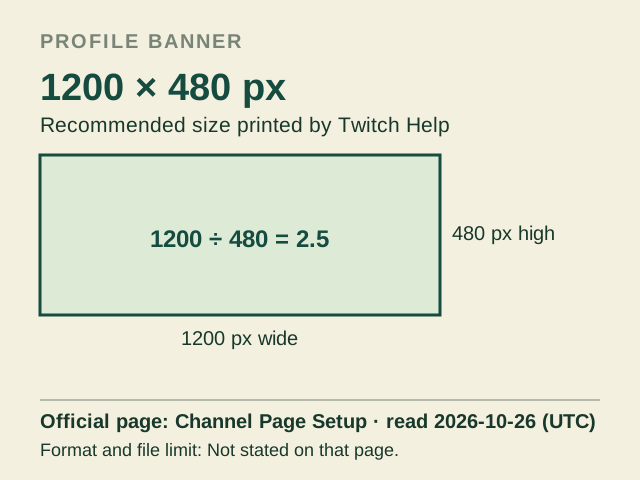
Twitch says profile banner images shorter or taller than 480 px are scaled to 480 px high. It also says Twitch pages and banner art scale with the browser width. The table does not apply the profile picture’s 10 MB limit to the profile banner or panels.
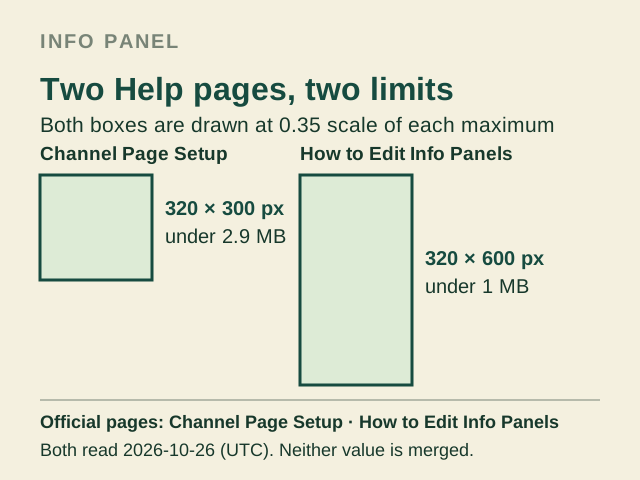
Profile banner: Twitch Help prints 1200 × 480 px as the recommended size. The same page says images shorter or taller than 480 px are scaled to 480 px high, and that Twitch pages and banner art scale with the browser width. Official page: Channel Page Setup, read 2026-10-26 (UTC). The rectangle shows the published ratio, not a measured file.Info panels: Channel Page Setup says no larger than 320 × 300 px and files under 2.9 MB; How to Edit Info Panels says no larger than 320 × 600 px and files under 1 MB. Both were read 2026-10-26 (UTC). Each box is drawn at 0.35 scale of its own published maximum; no value is merged.
Common claim vs the official text
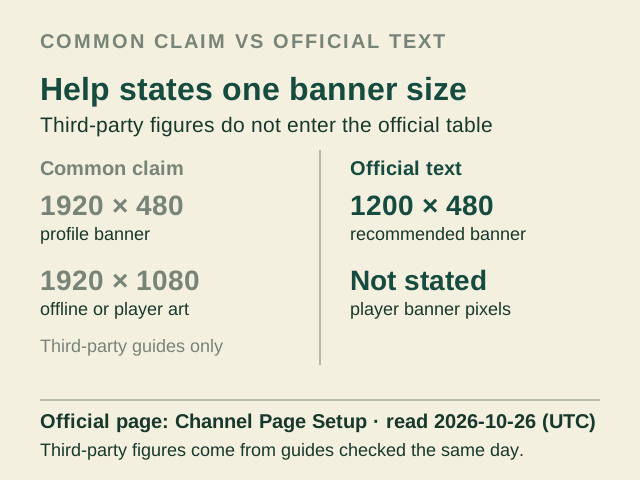
Common claim: the profile banner is 1920 × 480, and offline or video-player artwork is 1920 × 1080. Official text: Twitch recommends “The recommended size for a profile banner is 1200x480px.” The same page gives no pixel size for the video player banner and says, “This is displayed on the player when your channel is offline.”
This comparison records what third-party pages say, not a Twitch specification. Their offline artwork dimensions are not entered in the official table.
The same comparison as the two paragraphs above. Official page: Channel Page Setup, read 2026-10-26 (UTC). The 1920 × 480 and 1920 × 1080 figures come from third-party guides checked the same day and are not a Twitch specification.
YOUR EXPORTActual encoded file
Choose an image to begin.
No image loaded.
Before you upload
Choose an image to see the four checks.
The checks cover the exported pixels, the official aspect ratio, the published file-size ceiling and JPG/PNG format. A 2× export fails the pixel check when it exceeds the selected project’s official size; the file-size check uses “under” where Twitch says under. This does not promise that Twitch will display the image as expected.
Twitch banner dimensions, without guessing
Twitch recommends 1200 × 480 px for a profile banner. The same help page gives no pixel size for the video player banner, so a search for dimensions for Twitch banner should not treat a third-party offline-screen canvas as an official video player banner size. Profile picture pixels are also Not stated on the pages read.
If you searched for Twitch panel size, the two official pages disagree: Channel Page Setup says no larger than 320 × 300 px and files under 2.9 MB; How to Edit Info Panels says no larger than 320 × 600 px and files under 1 MB. This page keeps both published versions separate.
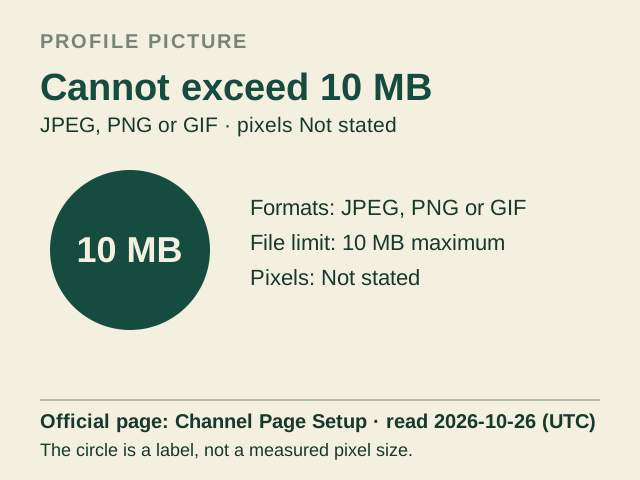
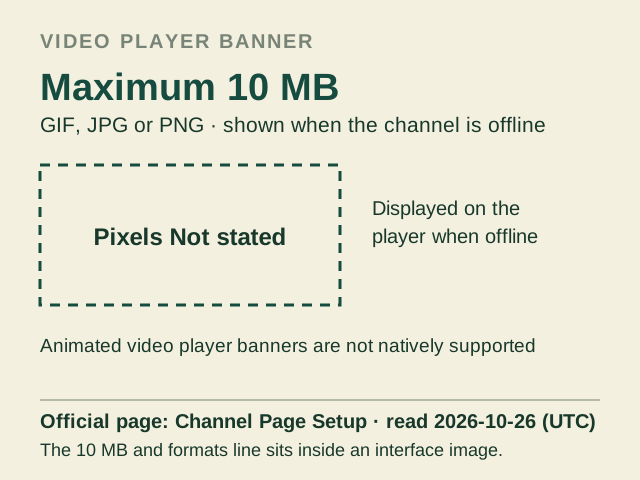
Profile picture: must be JPEG, PNG or GIF and cannot exceed 10 MB. Profile picture pixels are Not stated on the page read, and this 10 MB limit belongs to the profile picture only. Official page: Channel Page Setup, read 2026-10-26 (UTC). The circle is a label, not a measured pixel size.Video player banner: GIF, JPG or PNG with a maximum of 10 MB, shown on the player when the channel is offline. Pixels are Not stated, and animated video player banners are not natively supported. The 10 MB and formats line sits inside an interface image on that page. Official page: Channel Page Setup, read 2026-10-26 (UTC). The dashed frame is a placeholder, not a size.
Why a 2× export can fail
Twitch gives one profile banner size, 1200 × 480 px, and says images shorter or taller than 480 px are scaled to 480 px high. A 2× export is 2400 × 960 px. The tool marks that export as failing the official pixel check rather than promising an accepted upload or a sharper result.
The same rule applies to the panel canvases. 2× doubles both sides, so it exceeds each published maximum. It cannot add detail that was not in the source image, and this page does not know how Twitch scales or compresses an upload.
How to use this Twitch banner cropper
Choose a JPG, PNG or WebP image from your device.
Select the profile banner or one of the two panel canvases. Use Fill to crop to the canvas or Fit to keep the whole image with a background colour.
Choose 1× or 2×, JPG or PNG, then inspect the preview and the four checks.
Download or copy the encoded file. If the export exceeds an official limit, choose 1× or lower the JPG quality and export again.
Every crop is made locally in this browser. No account is needed and no image is sent to ThumbGlance.
Questions
What is the Twitch banner size?
Twitch’s Channel Page Setup page recommends 1200 × 480 px for a profile banner.
What is the Twitch panel size?
The Channel Page Setup page says panel images should be no larger than 320 × 300 px and files must be under 2.9 MB. Its linked How to Edit Info Panels page says 320 × 600 px and under 1 MB. Both rows remain separate.
What is the profile picture or video player banner size?
Twitch does not state profile picture pixels on the page read. It lists JPEG, PNG or GIF and a 10 MB ceiling for the profile picture. The video player banner has no published pixels; Twitch lists GIF, JPG or PNG and a 10 MB maximum.
Does 2× guarantee a sharper banner?
No. It exports twice the selected width and height at the same ratio. It cannot add detail that was not in the source image and does not predict Twitch’s processing.
Are my images uploaded or stored?
No. Decoding, cropping and encoding happen in this browser. The page does not upload or store your image.
Where do the numbers come from?
Each row links to a Twitch Help page read on 2026-10-26 UTC. Values a page did not state are marked Not stated rather than filled from another site.
 ThumbGlance